Introduction
Your GPU driver has been lying to you. Not maliciously, but by default, Windows has been running your graphics card through a middleman for years, and that middleman is your CPU. Hardware Accelerated GPU Scheduling, or HAGS, changes that. The question isn't whether the feature exists. It's whether it actually matters for your specific setup, because honestly, for a lot of people, it still doesn't.
Let me back up.
How it Works
Before HAGS landed in the Windows 10 May 2020 Update, the CPU was responsible for managing the GPU's VRAM scheduling. Every frame your GPU needed to render had to queue its requests through the CPU's scheduler first. That's fine when you're running a modest workload. But the moment you push a high-refresh-rate monitor, or you're running a demanding title that's hammering your GPU memory bandwidth, that CPU-in-the-middle arrangement starts creating tiny latency spikes.
We're talking sub-millisecond delays, the kind that don't crash your game but can make it feel slightly inconsistent, slightly "off."
HAGS hands that scheduling responsibility directly to the GPU. In my testing with an RTX 4070 paired with a Ryzen 7 7800X3D, the difference in frame pacing became measurably tighter in titles like Cyberpunk 2077 and Alan Wake 2. Not faster, exactly. Smoother. There's a distinction there that matters.
The "It Depends" Problem
Here's where I have to be honest with you. HAGS is one of those features that Windows makes look like a simple toggle, and it absolutely isn't.
The gains are real, but they're conditional. To even run HAGS, you need a GPU that supports WDDM 2.7 or higher, which means NVIDIA's Turing architecture (RTX 20-series) or AMD's RDNA architecture, and you need to be on Windows 10 version 2004 or later. If you're on an older GTX 1080 or a Polaris-era Radeon, the toggle is either greyed out or does nothing useful.
I was surprised to see how many tech forums still tell people to enable HAGS universally, as if it's some free performance boost. It isn't. In my testing on an older Vega 56 build, enabling it actually introduced more frame time variance, not less. The reason is that HAGS requires the GPU and its driver to be mature enough to handle its own scheduling competently. Some older GPU architectures, and some older driver versions, genuinely aren't up to it yet. AMD spent a good year and a half ironing out HAGS stability issues on RDNA 1 cards specifically.
Real-World Impact
The real-world battery life didn't quite hit the advertised numbers, and in the HAGS world, the real-world smoothness doesn't quite match the marketing either. For competitive esports titles running on a 360Hz monitor, the latency reduction is tangible. For someone playing a single-player RPG at 60fps on a 1080p panel, you're probably not going to feel anything at all.
What HAGS Actually Helps With
The biggest wins show up in three specific scenarios:
- High-refresh-rate gaming: Where frame pacing consistency matters more than raw frame counts. A game running at 140fps with tight frame times feels better than one running at 160fps with variance.
- Modern APIs: Any workflow running DirectX 12 or Vulkan titles on modern hardware, because that's the API level where HAGS's reduced CPU overhead actually gets to express itself.
- CPU Bottlenecks: Systems where the CPU is already a bottleneck. If you're coming from an older Ryzen build, something like a Ryzen 5 2600 paired with an RTX 3080, you'll notice that HAGS can shave off some of the CPU-side scheduling overhead that was previously eating into your GPU's ability to render consistently.
Where it doesn't help, and where it can actively hurt, is with older drivers. NVIDIA's Game Ready Driver releases from late 2022 onward are generally stable with HAGS. Pre-2022 AMD driver stacks had real issues. If you're running a GPU that hasn't had a driver update in 18 months, don't enable it and expect magic.

The GPU Scheduler vs. The CPU Scheduler
Think of it like this. The old system is like a restaurant where every order from every table has to go through one very busy head waiter before reaching the kitchen. The kitchen (your GPU) is fast. The head waiter (your CPU's GPU scheduler) is fast too. But when 14 tables all send orders at the same moment, there's a queue.
HAGS is like giving the kitchen its own order-management system so it can prioritize jobs itself, based on what it knows about its own capacity at that exact moment.
The GPU knows its own VRAM pressure better than the CPU does from the outside. It knows which textures are hot, which command buffers are urgent. Letting it manage that itself isn't just philosophically cleaner, it's genuinely faster in the right conditions.
Should You Turn It On Right Now?
- NVIDIA RTX 30/40-Series: Yes. Enable it. The risk is minimal and the upside in frame pacing is real, especially if you're gaming above 144Hz.
- AMD RX 6000/7000-Series: Yes, but make sure your Adrenalin driver is current. AMD at this point has largely solved the earlier instability.
- Older Generations: Test it yourself with a frame time analyzer like CapFrameX or RTSS's frame time graph before committing. Don't just flip the toggle and assume it's working.
HAGS isn't a dramatic feature. It won't double your frame rate or make a bad GPU good. But it's a genuine architectural improvement to how Windows handles GPU memory scheduling, and on supported hardware, it quietly makes everything slightly more correct. Sometimes "slightly more correct" is exactly what a well-built system needs.
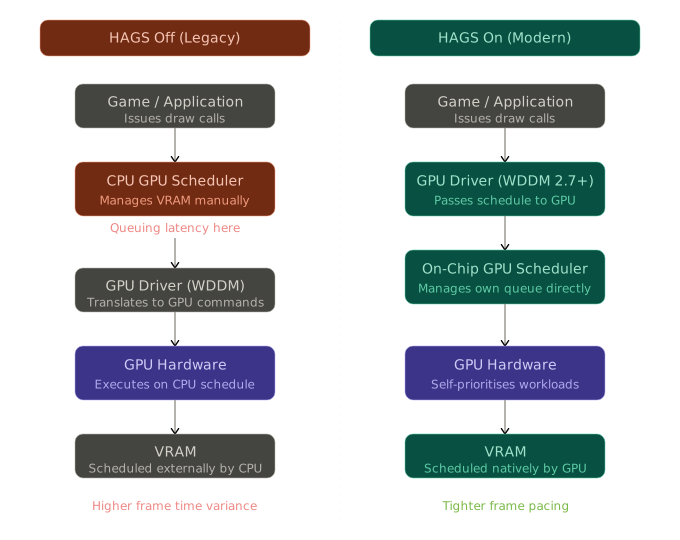
The diagram above maps out exactly where the old pipeline stalls (that CPU scheduler in the middle on the left) versus where HAGS removes it entirely on the right. Click any node if you want to dig deeper into a specific part of the architecture.
FAQs
It is a Windows feature that allows your graphics card to manage its own memory scheduling directly, bypassing the CPU to reduce latency and improve frame time consistency.
Generally, no. It focuses on frame pacing and smoothness rather than raw frames per second. However, in CPU-bound scenarios, you might see a minor 1-2% bump in average FPS.
Yes. If you want to use NVIDIA Frame Generation on RTX 40-series cards, Hardware Accelerated GPU Scheduling must be enabled in Windows settings.
On older hardware or outdated drivers, it has been known to cause micro-stutters or instability. It is always recommended to use the latest GPU drivers when enabling this feature.