
If you have been wondering whether your PC or Mac can handle The Sims 4, you are in good company. It is one of the most searched questions among new players and even returning ones who have upgraded their machines. The good news, based on specs published directly by EA and widely covered across PC gaming outlets, is that The Sims 4 is one of the most accessible life-sim games on the market. It does not demand a high-end rig, but that does not mean any old laptop will cut it either.
This guide breaks down the official Sims 4 game system requirements for both PC and Mac, explains what the specs actually mean in practice, and covers a few in-game settings that can stretch performance on weaker hardware. If you are planning a new build for your gaming setup, our PC Build Checker can help you ensure compatibility.
PC System Requirements for The Sims 4
According to EA's official support documentation, meeting the minimum specs allows the game to launch, but the recommended specs are what you should aim for to ensure a smooth experience as your Sim families and houses grow. If you're building from scratch, picking the best CPU for gaming is a critical first step.
| Component | Minimum Requirement | Recommended Requirement |
|---|---|---|
| Operating System | 64-bit Windows 10 | 64-bit Windows 10 |
| CPU | Intel Core i3-3220 / AMD Ryzen 3 1200 | Intel Core i5 (4 cores) / AMD Ryzen 5 or better |
| RAM | 4 GB | 8 GB |
| Storage | 25 GB + 1 GB for saves | 50 GB + 1 GB for saves |
| GPU | NVIDIA GeForce 6600 / ATI Radeon X1300 | NVIDIA GTX 650 / AMD Radeon HD 7750 |
| Video RAM | 128 MB | 1 GB |
| DirectX | DirectX 11 compatible | DirectX 11 compatible |
Meeting the minimum means the game will technically launch, but players on outlets like PC Games N and Carl's Sims 4 Guide consistently note that minimum-spec machines tend to struggle once saves get large, especially with a lot of custom content or expansion packs installed. If you are unsure about your current hardware, you can follow our guide on how to check RAM on PC.
Mac System Requirements for The Sims 4
Mac players are not left out. EA publishes separate specs for macOS, and The Sims 4 runs on Apple hardware going back several years. The minimum macOS requirement is macOS 10.15 Catalina with Metal support.
| Component | Minimum (Mac) | Recommended (Mac) |
|---|---|---|
| macOS Version | macOS 10.15 Catalina (Metal required) | macOS 10.11 El Capitan or later |
| CPU | Intel Core i3-3225 3.53 GHz | Intel Core i5 (4 cores) or better |
| RAM | 4 GB | 8 GB |
| Storage | 25 GB + 1 GB for saves | 50 GB + 1 GB for saves |
| GPU | Intel HD 4000 (Integrated) | Intel HD and Iris Graphics (HD 4000+) |
| Video RAM | 256 MB | 256 MB or better |
One thing worth flagging: Apple Silicon (M1, M2, M3, M4) Macs run The Sims 4 through Rosetta 2, and community reports on platforms like Reddit's r/TheSims consistently indicate strong performance on these machines, often better than equivalent Intel-based counterparts.
Does The Sims 4 Need a Dedicated Graphics Card?
This is a question that comes up constantly, and the answer is no, not necessarily. As noted in coverage from PC Games N and similar outlets, The Sims 4 can run on integrated graphics, making it one of the rare modern games where a dedicated GPU is optional rather than mandatory.
That said, integrated graphics do have limitations. Players running the base game on a laptop with an Intel UHD 620 or similar will generally be fine at lower graphic settings, but loading expansion packs, applying heavy custom content, or running the game at higher resolutions can push integrated graphics to their limit. A dedicated GPU with at least 1 GB of VRAM is the smarter long-term choice if you plan to go deep into the game. Check out our guide on the best GPU for 1440p gaming if you want to push your settings to the max.
How to Check Your PC Specs
Before jumping to conclusions about whether your machine meets the Sims 4 game system requirements, it is worth doing a quick check.
On Windows:
- Right-click "This PC" (or "My Computer") on your desktop or in File Explorer.
- Select Properties to see your processor, RAM, and operating system.
- To see your graphics card, open Device Manager and expand the "Display Adapters" section.
For a more automated check, EA themselves point players toward the System Requirements Lab's "Can You RUN It" tool for The Sims 4, which scans your PC and compares it against the minimum and recommended thresholds instantly.
On Mac: The built-in About This Mac option under the Apple menu shows all relevant hardware details in one screen.
Laptop Mode: A Useful Trick for Underpowered Machines
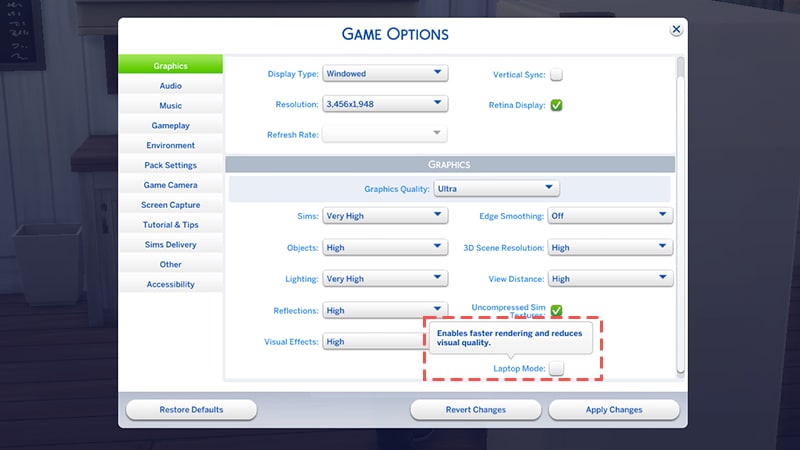
EA has built a Laptop Mode directly into The Sims 4, specifically for machines that sit at or near the minimum spec. According to EA's documentation, enabling Laptop Mode improves frame rate and makes the game run more efficiently, which also helps with battery life on portable machines.
To enable it:
- Open the in-game menu (the "..." icon).
- Select Game Options.
- Check the Laptop Mode box.
It is a small setting but one that makes a meaningful difference on weaker hardware based on reports from the player community.
Memory Boost: EA's Newer Performance Feature
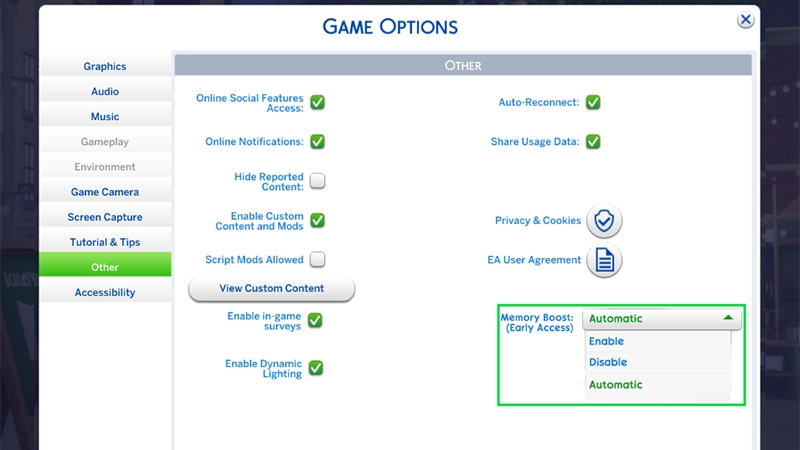
EA introduced a Memory Boost feature for PC players that is currently in Early Access. As described in EA's own help documentation, it optimizes memory usage to help reduce lag, improve frame rates, and reduce crash frequency. It works on DirectX 11 only and does not function on the older DX9 path.
Memory Boost can be set to three modes: Enable, Disable, or Automatic (which lets the game decide based on your system). To access it, go to Game Options, then Other, and use the Memory Boost dropdown. Players on hardware that meets the recommended spec have reported noticeably smoother sessions after enabling it, particularly in large households or worlds with many active NPCs. For more performance tips, see our guide on hardware-accelerated GPU scheduling.
Storage: How Much Space Does The Sims 4 Actually Need?
The base game installation requires at least 25 GB of free space at minimum and 50 GB at the recommended tier. However, if you plan to run expansion packs, game packs, or stuff packs, storage needs scale considerably.
Community tracking on sites like The Sims Wiki and fan databases suggests that a fully loaded Sims 4 install with all major expansions can push well past 100 GB. Add custom content and mods into the mix and storage planning becomes genuinely important. An SSD is not required but noticeably reduces load times based on comparisons documented across PC gaming communities.
Can The Sims 4 Run on Older Hardware?
Technically, yes. The minimum CPU requirement of an Intel Core i3-3220 dates back to 2012, which tells you how far back EA is willing to stretch compatibility. However, running the game on genuinely old hardware, say a machine from 2013 or 2014, comes with trade-offs. Long save times, reduced graphic settings, and occasional crashes in complex saves are well-documented on EA's community forums for players in that situation.
If the machine in question has a dual-core CPU under 3 GHz, less than 4 GB of RAM, or a GPU that predates the NVIDIA GeForce 6600 era, the experience will likely be frustrating rather than fun.
Frequently Asked Questions
The minimum spec for The Sims 4 on PC, per EA's official documentation, is a 64-bit Windows 10 installation, an Intel Core i3-3220 or AMD Ryzen 3 1200 processor, 4 GB of RAM, 25 GB of free storage, and a GPU that supports Pixel Shader 3.0 with at least 128 MB of VRAM. DirectX 11 compatibility is also required.
It can, but with limitations. EA's Laptop Mode is specifically designed for machines at or near the minimum spec, and enabling it improves frame rates and overall stability. On a laptop with integrated Intel HD 4000 graphics or newer and at least 4 GB of RAM, the base game is reported to run at lower graphic settings. Expansion packs and heavy mod loads are more demanding and may not run well on very low-end configurations.
The minimum is 4 GB of RAM, and the recommended spec is 8 GB. Based on community experience documented across forums like EA's official boards and Reddit's r/TheSims, 8 GB is the practical sweet spot for a smooth experience, especially with expansion packs installed. Players with 16 GB report even better headroom for mods and large households.
Yes. EA publishes separate Mac system requirements, with a minimum of macOS 10.15 Catalina and an Intel Core i3 processor. On Apple Silicon Macs (M1, M2, M3, M4 chips), the game runs via Rosetta 2 and community consensus is that performance is generally strong, often better than what older Intel Mac users experience.
No. The Sims 4 is one of the few modern games that officially supports integrated graphics. Intel GMA X4500 meets the minimum GPU threshold. That said, for recommended-level performance with the GPU driving 1 GB of VRAM, a dedicated card like the NVIDIA GTX 650 or AMD Radeon HD 7750 makes a real difference, particularly when running expansion packs or higher graphic settings.
The base game requires 25 GB at minimum and EA recommends having 50 GB free for a more comfortable setup. With expansion packs, game packs, and stuff packs added in, total installs documented by the community routinely exceed 100 GB. Players who use custom content and mods should plan for additional space on top of that.
EA's official minimum requirement is 64-bit Windows 10. 32-bit operating systems are not supported. Windows 11 is not explicitly listed in the minimum spec but the game is broadly reported to run without issue on Windows 11 across community forums and gaming coverage outlets.
Memory Boost is an opt-in PC feature introduced by EA to help optimize memory usage during gameplay. It targets lag reduction, frame rate improvements, and crash prevention. It is currently in Early Access and requires DirectX 11 to function. It can be enabled under Game Options in the Other tab, and players can also set it to Automatic to let the game choose the best mode for their hardware.
Yes, 4 GB RAM is the minimum requirement listed by EA. However, based on widespread player feedback on EA's official forums, 4 GB is tight in practice. The base game may run, but with expansion packs, mods, or large saves, players on 4 GB systems report slowdowns and occasional crashes. Upgrading to 8 GB is frequently recommended as the most cost-effective improvement for players experiencing performance issues.
The Sims 4 base game became free-to-play in October 2022. The system requirements remain the same regardless of whether you are playing the free version or a copy purchased before the free transition. Expansion packs, game packs, and stuff packs are still paid add-ons and can increase the overall storage and performance demands of the game.
Knowing how to check and meet the Sims 4 game system requirements is the first step toward a stable experience. While the game is remarkably accessible, the combination of expansion packs and custom content can quickly push a machine to its limits. Planning for at least 8 GB of RAM and 50 GB of storage is the smartest way to ensure your game stays fun rather than frustrating as your Sim families grow. If you're ready to upgrade, our PC Build Checker can help you find the perfect parts for your budget.
Sources: EA Help (Official Sims 4 System Requirements), EA Community Forums, PC Games N, Carl's Sims 4 Guide, The Sims Wiki on Fandom.
Written by Muneeb Rehan for TheTechCompare.com